# Prompt-based methods
A prompt can describe a task or provide an example of a task you want the model to learn. Instead of manually creating these prompts, soft prompting methods add learnable parameters to the input embeddings that can be optimized for a specific task while keeping the pretrained model's parameters frozen. This makes it both faster and easier to finetune large language models (LLMs) for new downstream tasks.
The PEFT library supports several types of prompting methods (p-tuning, prefix tuning, prompt tuning) and you can learn more about how these methods work conceptually in the [Soft prompts](../conceptual_guides/prompting) guide. If you're interested in applying these methods to other tasks and use cases, take a look at our [notebook collection](https://huggingface.co/spaces/PEFT/soft-prompting)!
This guide will show you how to train a causal language model - with a soft prompting method - to *generate a classification* for whether a tweet is a complaint or not.
> [!TIP]
> Some familiarity with the general process of training a causal language model would be really helpful and allow you to focus on the soft prompting methods. If you're new, we recommend taking a look at the [Causal language modeling](https://huggingface.co/docs/transformers/tasks/language_modeling) guide first from the Transformers documentation. When you're ready, come back and see how easy it is to drop PEFT in to your training!
Before you begin, make sure you have all the necessary libraries installed.
```bash
pip install -q peft transformers datasets
```
## Dataset
For this guide, you'll use the `twitter_complaints` subset of the [RAFT](https://huggingface.co/datasets/ought/raft) dataset. The `twitter_complaints` subset contains tweets labeled as `complaint` and `no complaint` and you can check out the [dataset viewer](https://huggingface.co/datasets/ought/raft/viewer/twitter_complaints) for a better idea of what the data looks like.
Use the [`~datasets.load_dataset`] function to load the dataset and create a new `text_label` column so it is easier to understand what the `Label` values, `1` and `2` mean.
```py
from datasets import load_dataset
ds = load_dataset(
"parquet",
data_files={
"train": "hf://datasets/ought/raft@refs/convert/parquet/twitter_complaints/train/0000.parquet",
"test": "hf://datasets/ought/raft@refs/convert/parquet/twitter_complaints/test/0000.parquet"
}
)
classes = [k.replace("_", " ") for k in ds["train"].features["Label"].names]
ds = ds.map(
lambda x: {"text_label": [classes[label] for label in x["Label"]]},
batched=True,
num_proc=1,
)
ds["train"][0]
{"Tweet text": "@HMRCcustomers No this is my first job", "ID": 0, "Label": 2, "text_label": "no complaint"}
```
Load a tokenizer, define the padding token to use, and determine the maximum length of the tokenized label.
```py
from transformers import AutoTokenizer
tokenizer = AutoTokenizer.from_pretrained("bigscience/bloomz-560m")
if tokenizer.pad_token_id is None:
tokenizer.pad_token_id = tokenizer.eos_token_id
target_max_length = max([len(tokenizer(class_label)["input_ids"]) for class_label in classes])
print(target_max_length)
```
Create a preprocessing function that tokenizes the tweet text and labels, pad the inputs and labels in each batch, create an attention mask, and truncate sequences to the `max_length`. Then convert the `input_ids`, `attention_mask`, and `labels` to PyTorch tensors.
```py
import torch
max_length = 64
def preprocess_function(examples, text_column="Tweet text", label_column="text_label"):
batch_size = len(examples[text_column])
inputs = [f"{text_column} : {x} Label : " for x in examples[text_column]]
targets = [str(x) for x in examples[label_column]]
model_inputs = tokenizer(inputs)
labels = tokenizer(targets)
classes = [k.replace("_", " ") for k in ds["train"].features["Label"].names]
for i in range(batch_size):
sample_input_ids = model_inputs["input_ids"][i]
label_input_ids = labels["input_ids"][i]
model_inputs["input_ids"][i] = [tokenizer.pad_token_id] * (
max_length - len(sample_input_ids)
) + sample_input_ids
model_inputs["attention_mask"][i] = [0] * (max_length - len(sample_input_ids)) + model_inputs[
"attention_mask"
][i]
labels["input_ids"][i] = [-100] * (max_length - len(label_input_ids)) + label_input_ids
model_inputs["input_ids"][i] = torch.tensor(model_inputs["input_ids"][i][:max_length])
model_inputs["attention_mask"][i] = torch.tensor(model_inputs["attention_mask"][i][:max_length])
labels["input_ids"][i] = torch.tensor(labels["input_ids"][i][:max_length])
model_inputs["labels"] = labels["input_ids"]
return model_inputs
```
Apply the preprocessing function to the entire dataset with the [`~datasets.Dataset.map`] function, and remove the unprocessed columns because the model won't need them.
```py
processed_ds = ds.map(
preprocess_function,
batched=True,
num_proc=1,
remove_columns=ds["train"].column_names,
load_from_cache_file=False,
desc="Running tokenizer on dataset",
)
```
Finally, create a training and evaluation [`DataLoader`](https://pytorch.org/docs/stable/data.html#torch.utils.data.DataLoader). You can set `pin_memory=True` to speed up the data transfer to the GPU during training if the samples in your dataset are on a CPU.
```py
from torch.utils.data import DataLoader
from transformers import default_data_collator
train_ds = processed_ds["train"]
eval_ds = processed_ds["test"]
batch_size = 16
train_dataloader = DataLoader(train_ds, shuffle=True, collate_fn=default_data_collator, batch_size=batch_size, pin_memory=True)
eval_dataloader = DataLoader(eval_ds, collate_fn=default_data_collator, batch_size=batch_size, pin_memory=True)
```
## Model
Now let's load a pretrained model to use as the base model for the soft prompt method. This guide uses the [bigscience/bloomz-560m](https://huggingface.co/bigscience/bloomz-560m) model, but you can use any causal language model you want.
```py
from transformers import AutoModelForCausalLM
model = AutoModelForCausalLM.from_pretrained("bigscience/bloomz-560m")
```
### PEFT configuration and model
For any PEFT method, you'll need to create a configuration which contains all the parameters that specify how the PEFT method should be applied. Once the configuration is setup, pass it to the [`~peft.get_peft_model`] function along with the base model to create a trainable [`PeftModel`].
> [!TIP]
> Call the [`~PeftModel.print_trainable_parameters`] method to compare the number of trainable parameters of [`PeftModel`] versus the number of parameters in the base model!
[P-tuning](../conceptual_guides/prompting#p-tuning) adds a trainable embedding tensor where the prompt tokens can be added anywhere in the input sequence. Create a [`PromptEncoderConfig`] with the task type, the number of virtual tokens to add and learn, and the hidden size of the encoder for learning the prompt parameters.
```py
from peft import PromptEncoderConfig, get_peft_model
peft_config = PromptEncoderConfig(task_type="CAUSAL_LM", num_virtual_tokens=20, encoder_hidden_size=128)
model = get_peft_model(model, peft_config)
model.print_trainable_parameters()
"trainable params: 300,288 || all params: 559,514,880 || trainable%: 0.05366935013417338"
```
[Prefix tuning](../conceptual_guides/prompting#prefix-tuning) adds task-specific parameters in all of the model layers, which are optimized by a separate feed-forward network. Create a [`PrefixTuningConfig`] with the task type and number of virtual tokens to add and learn.
```py
from peft import PrefixTuningConfig, get_peft_model
peft_config = PrefixTuningConfig(task_type="CAUSAL_LM", num_virtual_tokens=20)
model = get_peft_model(model, peft_config)
model.print_trainable_parameters()
"trainable params: 983,040 || all params: 560,197,632 || trainable%: 0.1754809274167014"
```
[Prompt tuning](../conceptual_guides/prompting#prompt-tuning) formulates all tasks as a *generation* task and it adds a task-specific prompt to the input which is updated independently. The `prompt_tuning_init_text` parameter specifies how to finetune the model (in this case, it is classifying whether tweets are complaints or not). For the best results, the `prompt_tuning_init_text` should have the same number of tokens that should be predicted. To do this, you can set `num_virtual_tokens` to the number of tokens of the `prompt_tuning_init_text`.
Create a [`PromptTuningConfig`] with the task type, the initial prompt tuning text to train the model with, the number of virtual tokens to add and learn, and a tokenizer.
```py
from peft import PromptTuningConfig, PromptTuningInit, get_peft_model
prompt_tuning_init_text = "Classify if the tweet is a complaint or no complaint.\n"
peft_config = PromptTuningConfig(
task_type="CAUSAL_LM",
prompt_tuning_init=PromptTuningInit.TEXT,
num_virtual_tokens=len(tokenizer(prompt_tuning_init_text)["input_ids"]),
prompt_tuning_init_text=prompt_tuning_init_text,
tokenizer_name_or_path="bigscience/bloomz-560m",
)
model = get_peft_model(model, peft_config)
model.print_trainable_parameters()
"trainable params: 8,192 || all params: 559,222,784 || trainable%: 0.0014648902430985358"
```
### Training
Set up an optimizer and learning rate scheduler.
```py
from transformers import get_linear_schedule_with_warmup
lr = 3e-2
num_epochs = 50
optimizer = torch.optim.AdamW(model.parameters(), lr=lr)
lr_scheduler = get_linear_schedule_with_warmup(
optimizer=optimizer,
num_warmup_steps=0,
num_training_steps=(len(train_dataloader) * num_epochs),
)
```
Move the model to the GPU and create a training loop that reports the loss and perplexity for each epoch.
```py
from tqdm import tqdm
device = "cuda"
model = model.to(device)
for epoch in range(num_epochs):
model.train()
total_loss = 0
for step, batch in enumerate(tqdm(train_dataloader)):
batch = {k: v.to(device) for k, v in batch.items()}
outputs = model(**batch)
loss = outputs.loss
total_loss += loss.detach().float()
loss.backward()
optimizer.step()
lr_scheduler.step()
optimizer.zero_grad()
model.eval()
eval_loss = 0
eval_preds = []
for step, batch in enumerate(tqdm(eval_dataloader)):
batch = {k: v.to(device) for k, v in batch.items()}
with torch.no_grad():
outputs = model(**batch)
loss = outputs.loss
eval_loss += loss.detach().float()
eval_preds.extend(
tokenizer.batch_decode(torch.argmax(outputs.logits, -1).detach().cpu().numpy(), skip_special_tokens=True)
)
eval_epoch_loss = eval_loss / len(eval_dataloader)
eval_ppl = torch.exp(eval_epoch_loss)
train_epoch_loss = total_loss / len(train_dataloader)
train_ppl = torch.exp(train_epoch_loss)
print(f"{epoch=}: {train_ppl=} {train_epoch_loss=} {eval_ppl=} {eval_epoch_loss=}")
```
## Share your model
Once training is complete, you can upload your model to the Hub with the [`~transformers.PreTrainedModel.push_to_hub`] method. You'll need to login to your Hugging Face account first and enter your token when prompted.
```py
from huggingface_hub import notebook_login
account =
peft_model_id = f"{account}/bloomz-560-m-peft-method"
model.push_to_hub(peft_model_id)
```
If you check the model file size in the repository, you’ll see that it is a lot smaller than a full sized model!
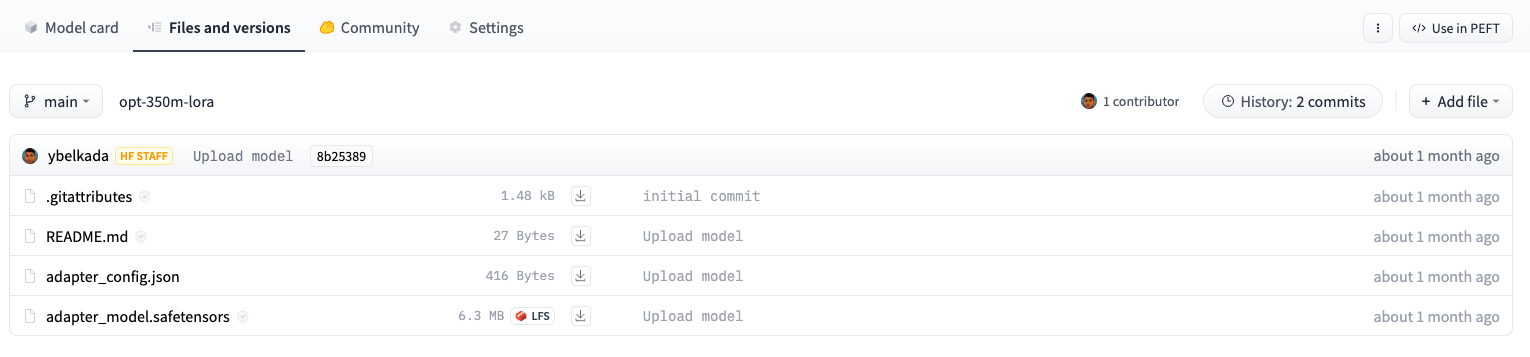 For example, the adapter weights for a opt-350m model stored on the Hub are only ~6MB compared to the full model size which can be ~700MB.
## Inference
Let's load the model for inference and test it out on a tweet!
```py
from peft import AutoPeftModelForCausalLM
model = AutoPeftModelForCausalLM.from_pretrained("peft_model_id").to("cuda")
tokenizer = AutoTokenizer.from_pretrained("bigscience/bloomz-560m")
i = 15
inputs = tokenizer(f'{text_column} : {ds["test"][i]["Tweet text"]} Label : ', return_tensors="pt")
print(ds["test"][i]["Tweet text"])
"@NYTsupport i have complained a dozen times & yet my papers are still thrown FAR from my door. Why is this so hard to resolve?"
```
Call the [`~transformers.GenerationMixin.generate`] method to generate the predicted classification label.
```py
with torch.no_grad():
inputs = {k: v.to(device) for k, v in inputs.items()}
outputs = model.generate(input_ids=inputs["input_ids"], max_new_tokens=10)
print(tokenizer.batch_decode(outputs.detach().cpu().numpy(), skip_special_tokens=True))
"['Tweet text : @NYTsupport i have complained a dozen times & yet my papers are still thrown FAR from my door. Why is this so hard to resolve? Label : complaint']"
```