
Spaces:
Running


title: LifeFlow AI - Intelligent Trip Planning System
emoji: 🗺️
colorFrom: blue
colorTo: green
sdk: gradio
sdk_version: 5.49.1
app_file: app.py
pinned: false
license: mit
short_description: Don't just plan the trip. Design the flow.
thumbnail: >-
  https://cdn-uploads.huggingface.co/production/uploads/660ffb10d1eab2dd6da8a060/0AFXUPGhKtD3K7RHYT-Ek.png
tags:
  - mcp-in-action-track-enterprise
  - mcp-in-action-track-consumer
  - mcp-in-action-track-creative
✨ LifeFlow AI: Intelligent Trip Planning System






Your journey, in perfect rhythm. An enterprise-grade, multi-agent system that orchestrates your daily schedule using real-world data, hybrid AI architecture, and mathematical optimization.
👥 Team
Team Information:
- Man-Ho Li - @Marco310 - Lead Developer & AI Architect
- Chen-Yang Yu - @LittleFish-Coder - Technical Consultant & Marketing Director
📺 Demo & Submission
🛠️ Technical Walkthrough
See the "Dual-Brain" architecture in action. Watch how LifeFlow transforms a vague prompt into a fully optimized itinerary.
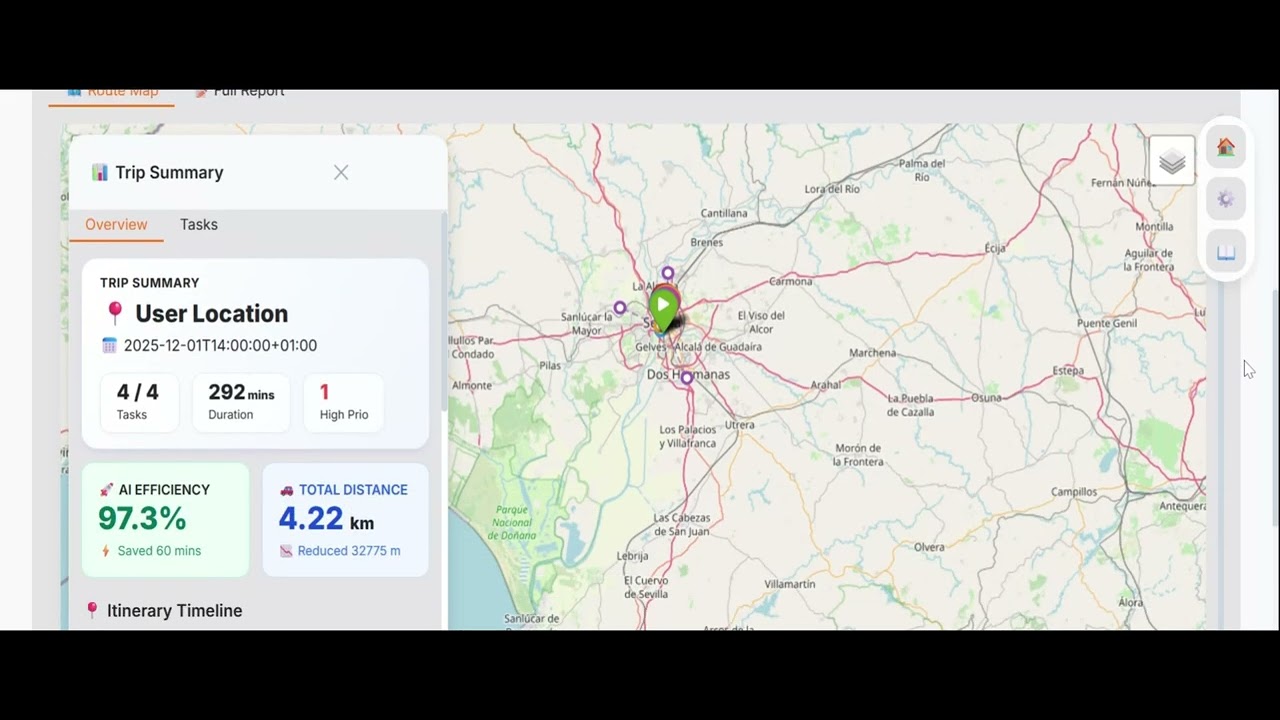
Click the image or the button below to watch the full demo

🎬 Product Trailer
Experience the vision. Watch our cinematic trailer showing the "One Man Army" journey.
👉 Watch Product Trailer
📅 Submission Details
- Submission Date: November 2025
- Social Media Post: 🔗 View on LinkedIn
📖 Overview
LifeFlow AI is not just a chatbot; it's a State Machine for Real-World Operations. It solves the complexity of daily travel planning—considering traffic, weather, opening hours, and route optimization—by coordinating a team of specialized AI agents.
Unlike traditional AI planners that hallucinate locations, LifeFlow grounds every decision in Real-Time Data (Google Maps & OpenWeather) and uses Mathematical Optimization (TSP/OR-Tools) for routing.
🏆 Special Access for Reviewers
To ensure a smooth testing experience during the 15-day review period, we have pre-configured default API keys in the environment.
- Zero Setup: You do NOT need to provide your own API keys for Google Maps, OpenWeather, or LLMs (Gemini-free tier, Groq-free).
- Ready to Run: Simply interact with the UI; the backend is fully authenticated.
- Note: These promotional keys have usage quotas and will be rotated after the review phase.
🚀 Key Innovation: Hybrid AI Architecture
We solve the "Trilemma" of AI Agents: Cost vs. Speed vs. Intelligence.
1. Dual-Brain System 🧠 + ⚡
Instead of using one expensive model for everything, LifeFlow uses a tiered approach:
- Primary Brain (The Leader): Uses high-reasoning models (e.g., GPT-5, Gemini 2.5 Pro) for complex intent understanding, team orchestration, and final report generation.
- Acceleration Layer (The Muscle): Uses ultra-fast, low-cost models (e.g., Groq/Llama-3, Qwen 2.5, Gemini Flash-lite, GPT mini) for high-volume tool execution (searching POIs, checking weather).
2. Context-Offloading Protocol 📉
Traditional agents paste massive JSON search results into the chat context, burning thousands of tokens.
- LifeFlow's Approach: Agents treat data like "Hot Potatoes."
- Mechanism: Raw data (reviews, photos, coordinates) is offloaded to a structured database immediately. Agents only pass Reference IDs (e.g.,
scout_result_123) to the next agent. - Result: Token consumption reduced by 75% (from ~80k to ~20k per run).
🤖 The Agent Team
LifeFlow orchestrates 6 specialized agents working in a strict pipeline:
- 📋 Planner: Analyzes vague user requests (e.g., "I need to buy coffee and visit the bank") and converts them into structured JSON tasks.
- 👨✈️ Team Leader: The State Machine orchestrator. Enforces SOPs and handles error recovery.
- 🗺️ Scout (Fast Mode): Interacts with Google Places API to verify locations and retrieve coordinates.
- ⚡ Optimizer (Fast Mode): Uses routing algorithms to solve the Traveling Salesperson Problem (TSP) with time windows.
- 🧭 Navigator (Fast Mode): Calculates precise traffic impacts and generates polyline routes.
- 🌤️ Weatherman (Fast Mode): Checks hyper-local weather forecasts for specific arrival times.
- 📊 Presenter: Compiles all data (from the DB) into a human-readable, formatted report.
🛠️ Features
- BYOK (Bring Your Own Key): Secure client-side key management for Google Maps, OpenWeather, and LLMs.
- Zero-Cost Validation: Smart API testing mechanism that checks key validity without incurring charges.
- Interactive Map: Visualizes routes, stops, and alternative POIs using Folium.
- Graceful Cancellation: Cooperative signal handling to terminate background agents instantly.
- Reactive UI: Modern Gradio interface with real-time streaming and responsive layouts.
⚙️ Configuration
LifeFlow AI allows deep customization via the Settings panel:
Supported Providers
- Google Gemini: 2.5 Pro, 2.5 Flash, 2.0 Flash.
- OpenAI: GPT-5, GPT-5-mini, GPT-4o-mini.
- Groq: Llama 3.3 70B, GPT-OSS 120B, Kimi K2.
Fast Mode (Hybrid)
Enable Fast Mode in settings to offload search and routing tasks to Groq. This significantly reduces latency and API costs while maintaining high-quality reasoning for the final output.
🛠️ Tech Stack & Components
| Component | Technology | Description |
|---|---|---|
| Frontend | Gradio | Reactive UI with custom CSS, Stepper, and Map integration. |
| Orchestration | Agno | Manages Agent state, memory, and team coordination. |
| Tool Protocol | FastMCP | Exposes Python functions as standardized AI tools. |
| Models | Google Gemini | Flash for Leader/Planner (Reasoning), Flash-Lite for Workers (Speed). |
| Optimization | Google OR-Tools | Solves TSPTW (Traveling Salesperson Problem with Time Windows). |
| Data Layer | SQLite | Local file-based repository for high-speed context offloading. |
💻 Local Installation
To run LifeFlow AI locally, follow these steps:
Prerequisites
- Python 3.11+
- Virtualenv (recommended)
Installation Steps
- Clone the repository
   git clone [https://huggingface.co/spaces/MCP-1st-Birthday/LifeFlow-AI](https://huggingface.co/spaces/MCP-1st-Birthday/LifeFlow-AI)
   cd LifeFlow-AI
- Create and activate a virtual environment
# Linux/MacOS
python -m venv venv
source venv/bin/activate

# Windows
python -m venv venv
venv\Scripts\activate
- Install dependencies
pip install -r requirements.txt
- Set up Environment Variables Create a .env file in the root directory (optional if using UI for keys):
# Search API
GOOGLE_MAPS_API_KEY=your_key_here
OPENWEATHER_API_KEY=your_key_here

# MODEL API
GOOGLE_API_KEY=your_key_here
OPENAI_API_KEY=your_key_here
GROQ_API_KEY=your_key_here
- Run the application
python app.py
📚 Documentation
Explore the technical details behind LifeFlow AI:
-
Deep dive into the "Dual-Brain" system, Context Offloading, and Exclusive MCP Channels.
-
Detailed roster of our 6 specialized agents, their models, tools, and prompt strategies.
-
Solutions for common API errors (Google/OpenWeather), JSON parsing issues, and Docker setup.
🙌 Acknowledgements
A huge thank you to the tools and frameworks that made LifeFlow AI possible:
- Agno (formerly Phidata): For providing the robust Agentic framework that powers our Scout, Weatherman, and Optimizer agents.
- Google Maps Platform: For the comprehensive Places and Routes APIs that ground our agents in real-world data.
- Google OR-Tools: For the powerful routing optimization algorithms.
- Gradio: For enabling the rapid development of our interactive UI.
- MCP-1st-Birthday: For the inspiration!
⚠️ Disclaimer
This application uses the Google Maps Platform API, which is a paid service.
- Cost: Users are responsible for any costs incurred by their API usage.
- Optimization: While LifeFlow AI is designed to be efficient, running multiple agents can consume API quotas quickly.
- Advice: We strongly recommend setting up Budgets & Alerts and Quotas in your Google Cloud Console before running this app extensively.
📄 License
This project is licensed under the MIT License - see the LICENSE file for details.