

File size: 8,282 Bytes
280504c 33cfa2a 582be00 33cfa2a 582be00 33cfa2a |
1 2 3 4 5 6 7 8 9 10 11 12 13 14 15 16 17 18 19 20 21 22 23 24 25 26 27 28 29 30 31 32 33 34 35 36 37 38 39 40 41 42 43 44 45 46 47 48 49 50 51 52 53 54 55 56 57 58 59 60 61 62 63 64 65 66 67 68 69 70 71 72 73 74 75 76 77 78 79 80 81 82 83 84 85 86 87 88 89 90 91 92 93 94 95 96 97 98 99 100 101 102 103 104 105 106 107 108 109 110 111 112 113 114 115 116 117 118 119 120 121 122 123 124 125 126 127 128 129 130 131 132 133 134 135 136 137 138 139 140 141 142 143 144 145 146 147 148 149 150 151 152 153 154 155 156 157 158 159 160 161 162 163 164 165 166 167 168 169 170 171 172 173 174 175 176 177 178 179 180 181 182 183 184 185 186 187 188 189 190 191 192 193 194 195 196 197 198 199 200 201 202 203 204 205 206 207 208 209 210 211 212 213 214 215 216 217 218 219 220 221 222 223 224 225 226 227 228 229 230 231 232 233 234 235 236 237 238 239 240 241 242 243 244 245 246 247 248 249 250 251 252 253 254 255 256 257 258 259 260 261 262 263 264 265 266 267 268 269 270 271 272 273 274 275 276 277 278 279 280 281 282 283 284 285 286 287 288 289 290 291 292 293 294 295 296 297 298 299 300 301 302 303 304 305 306 307 308 309 310 |
---
title: Flow2API
emoji: 🚀
colorFrom: blue
colorTo: green
sdk: docker
sdk_version: '1.0'
app_file: app.py
pinned: false
---
# Flow2API
<div align="center">
[](LICENSE)
[](https://www.python.org/)
[](https://fastapi.tiangolo.com/)
[](https://www.docker.com/)
**一个功能完整的 OpenAI 兼容 API 服务,为 Flow 提供统一的接口**
</div>
## ✨ 核心特性
- 🎨 **文生图** / **图生图**
- 🎬 **文生视频** / **图生视频**
- 🎞️ **首尾帧视频**
- 🔄 **AT自动刷新**
- 📊 **余额显示** - 实时查询和显示 VideoFX Credits
- 🚀 **负载均衡** - 多 Token 轮询和并发控制
- 🌐 **代理支持** - 支持 HTTP/SOCKS5 代理
- 📱 **Web 管理界面** - 直观的 Token 和配置管理
- 🎨 **图片生成连续对话**
## 🚀 快速开始
### 前置要求
- Docker 和 Docker Compose(推荐)
- 或 Python 3.8+
- 由于Flow增加了额外的验证码,你可以自行选择使用浏览器打码或第三发打码:
注册[YesCaptcha](https://yescaptcha.com/i/13Xd8K)并获取api key,将其填入系统配置页面```YesCaptcha API密钥```区域
- 自动更新st浏览器拓展:[Flow2API-Token-Updater](https://github.com/TheSmallHanCat/Flow2API-Token-Updater)
### 方式一:Docker 部署(推荐)
#### 标准模式(不使用代理)
```bash
# 克隆项目
git clone https://github.com/TheSmallHanCat/flow2api.git
cd flow2api
# 启动服务
docker-compose up -d
# 查看日志
docker-compose logs -f
```
#### WARP 模式(使用代理)
```bash
# 使用 WARP 代理启动
docker-compose -f docker-compose.warp.yml up -d
# 查看日志
docker-compose -f docker-compose.warp.yml logs -f
```
### 方式二:本地部署
```bash
# 克隆项目
git clone https://github.com/TheSmallHanCat/flow2api.git
cd flow2api
# 创建虚拟环境
python -m venv venv
# 激活虚拟环境
# Windows
venv\Scripts\activate
# Linux/Mac
source venv/bin/activate
# 安装依赖
pip install -r requirements.txt
# 启动服务
python main.py
```
### 方式三:Hugging Face 部署
1. **准备工作**
- 注册并登录 [Hugging Face](https://huggingface.co/)
- 创建一个新的 Space
- 选择 "Docker" 作为 Space 类型
2. **配置 Space**
- **Repository name**: 输入一个名称(例如 `flow2api`)
- **Visibility**: 选择 "Public" 或 "Private"
- **Hardware**: 选择适当的硬件配置(最低推荐 2GB RAM)
3. **部署步骤**
- 在 Space 的 "Files" 标签页中,上传项目的所有文件
- 确保 `app.py` 文件存在(Hugging Face 的部署入口)
- 确保 `requirements.txt` 文件包含所有必要的依赖
- 点击 "Build" 按钮开始部署
4. **访问服务**
- 部署完成后,通过 Space 提供的 URL 访问服务
- 默认登录地址: `https://<your-space-name>.hf.space/`
- 首次登录用户名: `admin`,密码: `admin`
5. **注意事项**
- Hugging Face Spaces 使用端口 7860,配置已自动适配
- 由于 Hugging Face 的网络环境,可能需要配置代理
- 建议在管理界面中修改默认的管理员密码
- 对于视频生成等耗时操作,可能会受到 Hugging Face 的资源限制
### 首次访问
服务启动后,访问管理后台: **http://localhost:8000**,首次登录后请立即修改密码!
- **用户名**: `admin`
- **密码**: `admin`
## 📋 支持的模型
### 图片生成
| 模型名称 | 说明| 尺寸 |
|---------|--------|--------|
| `gemini-2.5-flash-image-landscape` | 图/文生图 | 横屏 |
| `gemini-2.5-flash-image-portrait` | 图/文生图 | 竖屏 |
| `gemini-3.0-pro-image-landscape` | 图/文生图 | 横屏 |
| `gemini-3.0-pro-image-portrait` | 图/文生图 | 竖屏 |
| `imagen-4.0-generate-preview-landscape` | 图/文生图 | 横屏 |
| `imagen-4.0-generate-preview-portrait` | 图/文生图 | 竖屏 |
### 视频生成
#### 文生视频 (T2V - Text to Video)
⚠️ **不支持上传图片**
| 模型名称 | 说明| 尺寸 |
|---------|---------|--------|
| `veo_3_1_t2v_fast_portrait` | 文生视频 | 竖屏 |
| `veo_3_1_t2v_fast_landscape` | 文生视频 | 横屏 |
| `veo_2_1_fast_d_15_t2v_portrait` | 文生视频 | 竖屏 |
| `veo_2_1_fast_d_15_t2v_landscape` | 文生视频 | 横屏 |
| `veo_2_0_t2v_portrait` | 文生视频 | 竖屏 |
| `veo_2_0_t2v_landscape` | 文生视频 | 横屏 |
#### 首尾帧模型 (I2V - Image to Video)
📸 **支持1-2张图片:首尾帧**
| 模型名称 | 说明| 尺寸 |
|---------|---------|--------|
| `veo_3_1_i2v_s_fast_fl_portrait` | 图生视频 | 竖屏 |
| `veo_3_1_i2v_s_fast_fl_landscape` | 图生视频 | 横屏 |
| `veo_2_1_fast_d_15_i2v_portrait` | 图生视频 | 竖屏 |
| `veo_2_1_fast_d_15_i2v_landscape` | 图生视频 | 横屏 |
| `veo_2_0_i2v_portrait` | 图生视频 | 竖屏 |
| `veo_2_0_i2v_landscape` | 图生视频 | 横屏 |
#### 多图生成 (R2V - Reference Images to Video)
🖼️ **支持多张图片**
| 模型名称 | 说明| 尺寸 |
|---------|---------|--------|
| `veo_3_0_r2v_fast_portrait` | 图生视频 | 竖屏 |
| `veo_3_0_r2v_fast_landscape` | 图生视频 | 横屏 |
## 📡 API 使用示例(需要使用流式)
### 文生图
```bash
curl -X POST "http://localhost:8000/v1/chat/completions" \
-H "Authorization: Bearer han1234" \
-H "Content-Type: application/json" \
-d '{
"model": "gemini-2.5-flash-image-landscape",
"messages": [
{
"role": "user",
"content": "一只可爱的猫咪在花园里玩耍"
}
],
"stream": true
}'
```
### 图生图
```bash
curl -X POST "http://localhost:8000/v1/chat/completions" \
-H "Authorization: Bearer han1234" \
-H "Content-Type: application/json" \
-d '{
"model": "imagen-4.0-generate-preview-landscape",
"messages": [
{
"role": "user",
"content": [
{
"type": "text",
"text": "将这张图片变成水彩画风格"
},
{
"type": "image_url",
"image_url": {
"url": "data:image/jpeg;base64,<base64_encoded_image>"
}
}
]
}
],
"stream": true
}'
```
### 文生视频
```bash
curl -X POST "http://localhost:8000/v1/chat/completions" \
-H "Authorization: Bearer han1234" \
-H "Content-Type: application/json" \
-d '{
"model": "veo_3_1_t2v_fast_landscape",
"messages": [
{
"role": "user",
"content": "一只小猫在草地上追逐蝴蝶"
}
],
"stream": true
}'
```
### 首尾帧生成视频
```bash
curl -X POST "http://localhost:8000/v1/chat/completions" \
-H "Authorization: Bearer han1234" \
-H "Content-Type: application/json" \
-d '{
"model": "veo_3_1_i2v_s_fast_fl_landscape",
"messages": [
{
"role": "user",
"content": [
{
"type": "text",
"text": "从第一张图过渡到第二张图"
},
{
"type": "image_url",
"image_url": {
"url": "data:image/jpeg;base64,<首帧base64>"
}
},
{
"type": "image_url",
"image_url": {
"url": "data:image/jpeg;base64,<尾帧base64>"
}
}
]
}
],
"stream": true
}'
```
---
## 📄 许可证
本项目采用 MIT 许可证。详见 [LICENSE](LICENSE) 文件。
---
## 🙏 致谢
- [PearNoDec](https://github.com/PearNoDec) 提供的YesCaptcha打码方案
- [raomaiping](https://github.com/raomaiping) 提供的无头打码方案
感谢所有贡献者和使用者的支持!
---
## 📞 联系方式
- 提交 Issue:[GitHub Issues](https://github.com/TheSmallHanCat/flow2api/issues)
---
**⭐ 如果这个项目对你有帮助,请给个 Star!**
## Star History
[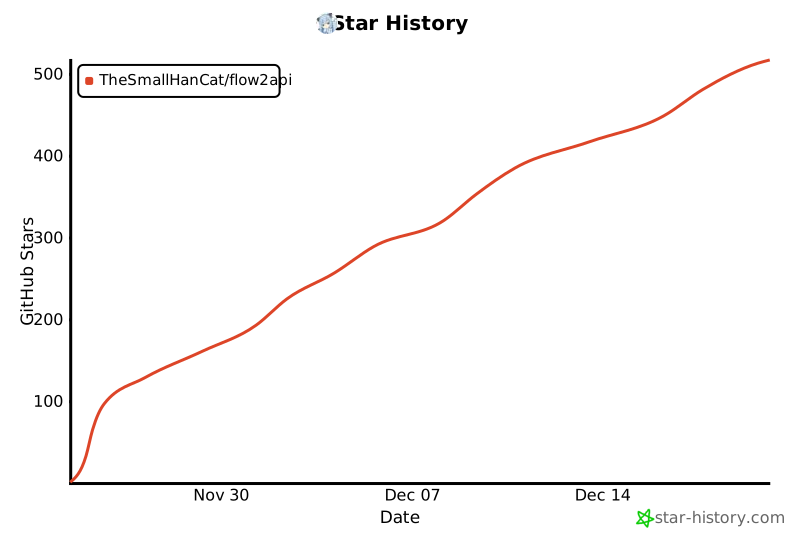](https://www.star-history.com/#TheSmallHanCat/flow2api&type=date&legend=top-left)
|