

The dataset viewer is not available for this subset.
Exception:    SplitsNotFoundError
Message:      The split names could not be parsed from the dataset config.
Traceback:    Traceback (most recent call last):
                File "/usr/local/lib/python3.12/site-packages/datasets/inspect.py", line 289, in get_dataset_config_info
                  for split_generator in builder._split_generators(
                                         ^^^^^^^^^^^^^^^^^^^^^^^^^^
                File "/usr/local/lib/python3.12/site-packages/datasets/packaged_modules/hdf5/hdf5.py", line 64, in _split_generators
                  with h5py.File(first_file, "r") as h5:
                       ^^^^^^^^^^^^^^^^^^^^^^^^^^
                File "/usr/local/lib/python3.12/site-packages/h5py/_hl/files.py", line 564, in __init__
                  fid = make_fid(name, mode, userblock_size, fapl, fcpl, swmr=swmr)
                        ^^^^^^^^^^^^^^^^^^^^^^^^^^^^^^^^^^^^^^^^^^^^^^^^^^^^^^^^^^^
                File "/usr/local/lib/python3.12/site-packages/h5py/_hl/files.py", line 238, in make_fid
                  fid = h5f.open(name, flags, fapl=fapl)
                        ^^^^^^^^^^^^^^^^^^^^^^^^^^^^^^^^
                File "h5py/_objects.pyx", line 56, in h5py._objects.with_phil.wrapper
                File "h5py/_objects.pyx", line 57, in h5py._objects.with_phil.wrapper
                File "h5py/h5f.pyx", line 102, in h5py.h5f.open
              FileNotFoundError: [Errno 2] Unable to synchronously open file (unable to open file: name = 'hf://datasets/Pi3DET/data@6e4057a349285fb7fe3e2f721eee4699d6b24132/processed/Drone/Outdoor_Day/fast_flight_2/cut_data.h5', errno = 2, error message = 'No such file or directory', flags = 0, o_flags = 0)

              The above exception was the direct cause of the following exception:

              Traceback (most recent call last):
                File "/src/services/worker/src/worker/job_runners/config/split_names.py", line 65, in compute_split_names_from_streaming_response
                  for split in get_dataset_split_names(
                               ^^^^^^^^^^^^^^^^^^^^^^^^
                File "/usr/local/lib/python3.12/site-packages/datasets/inspect.py", line 343, in get_dataset_split_names
                  info = get_dataset_config_info(
                         ^^^^^^^^^^^^^^^^^^^^^^^^
                File "/usr/local/lib/python3.12/site-packages/datasets/inspect.py", line 294, in get_dataset_config_info
                  raise SplitsNotFoundError("The split names could not be parsed from the dataset config.") from err
              datasets.inspect.SplitsNotFoundError: The split names could not be parsed from the dataset config.
Need help to make the dataset viewer work? Make sure to review how to configure the dataset viewer, and open a discussion for direct support.

Perspective-Invariant 3D Object Detection
Ao Liang*,1,2,3,4
Lingdong Kong*,1
Dongyue Lu*,1
Youquan Liu5
Jian Fang4
Huaici Zhao4
Wei Tsang Ooi1
1National University of Singapore
2University of Chinese Academy of Sciences
3Key Laboratory of Opto-Electronic Information Processing, Chinese Academy of Sciences
4Shenyang Institute of Automation, Chinese Academy of Sciences
5Fudan University
*Equally contributed to this work


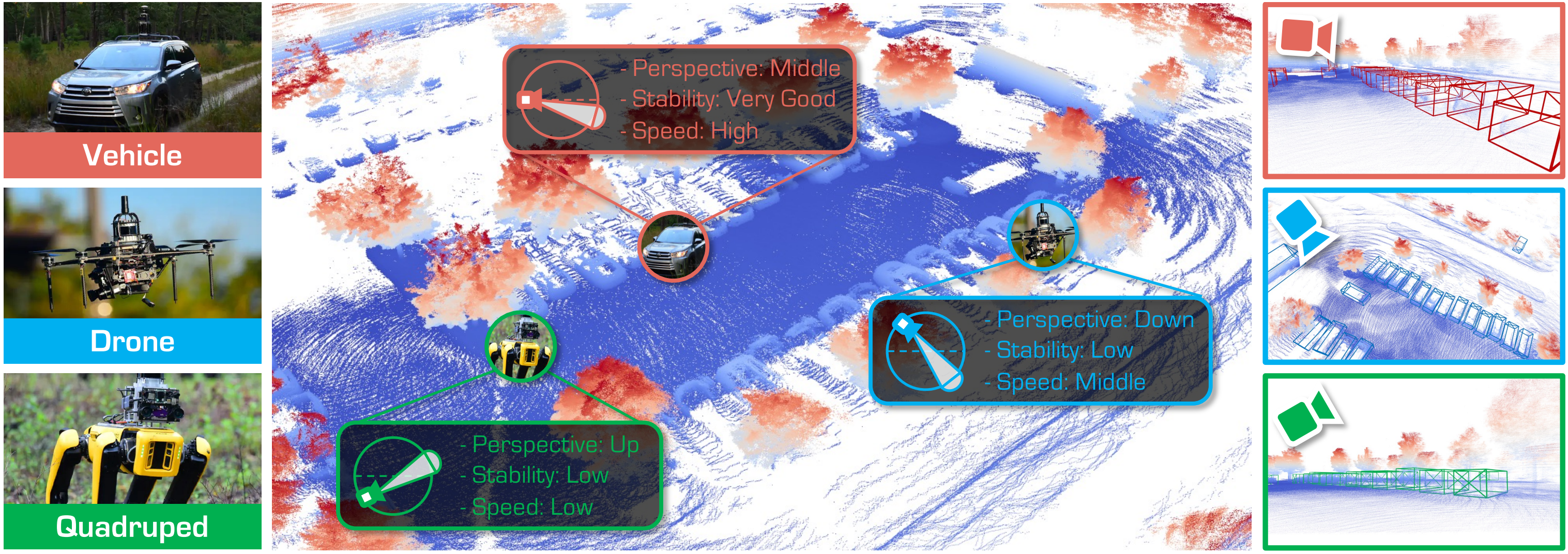
Updates
- [July 2025]: Project page released.
- [June 2025]: Pi3DET has been extended to Track 5: Cross-Platform 3D Object Detection of the RoboSense Challenge at IROS 2025. See the track homepage, GitHub repo for more details.
Todo
Since the Pi3DET dataset is being used for Track 5: Cross-Platform 3D Object Detection of the RoboSense Challenge at IROS 2025, in the interest of fairness we are temporarily not releasing all of the data and annotations. If you’re interested, we have open‑sourced a subset of the data and code—please refer to the track details for more information.
- Release Phase 1 dataset of the IROS Track, which is KITTI-like single-framee format.
- Release Phase 2 dataset of the IROS Track, which is KITTI-like single-framee format.
- Release all data of Pi3DET, which has temporal information.
Download
The Track 5 dataset follows the KITTI format. Each sample consists of:
- A front-view RGB image
- A LiDAR point cloud covering the camera’s field of view
- Calibration parameters
- 3D bounding-box annotations (for training)
Calibration and annotations are packaged together in
.pklfiles.
We use the same training set (vehicle platform) for both phases, but different validation sets. The full dataset is hosted on Hugging Face:
robosense/track5-cross-platform-3d-object-detection
- Download the dataset
python tools/load_dataset.py $USER_DEFINE_OUTPUT_PATH - Link data into the project
# Create target directory mkdir -p data/pi3det # Link the training split ln -s $USER_DEFINE_OUTPUT_PATH/track5-cross-platform-3d-object-detection/phase12_vehicle_training/training \ data/pi3det/training # Link the validation split for Phase 1 (Drone) ln -s $USER_DEFINE_OUTPUT_PATH/track5-cross-platform-3d-object-detection/phase1_drone_validation/validation \ data/pi3det/validation # Link the .pkl info files ln -s $USER_DEFINE_OUTPUT_PATH/track5-cross-platform-3d-object-detection/phase12_vehicle_training/training/pi3det_infos_train.pkl \ data/pi3det/pi3det_infos_train.pkl ln -s $USER_DEFINE_OUTPUT_PATH/track5-cross-platform-3d-object-detection/phase1_drone_validation/validation/pi3det_infos_val.pkl \ data/pi3det/pi3det_infos_val.pkl - Verify your directory structure
After linking, yourdata/folder should look like this:data/ └── pi3det/ ├── training/ │ ├── image/ │ │ ├── 0000000.jpg │ │ └── 0000001.jpg │ └── point_cloud/ │ ├── 0000000.bin │ └── 0000001.bin ├── validation/ │ ├── image/ │ │ ├── 0000000.jpg │ │ └── 0000001.jpg │ └── point_cloud/ │ ├── 0000000.bin │ └── 0000001.bin ├── pi3det_infos_train.pkl └── pi3det_infos_val.pkl
Pi3DET Dataset
Detailed statistic information
| Platform | Condition | Sequence | # of Frames | # of Points (M) | # of Vehicles | # of Pedestrians |
|---|---|---|---|---|---|---|
| Vehicle (8) | Daytime (4) | city_hall | 2,982 | 26.61 | 19,489 | 12,199 |
| penno_big_loop | 3,151 | 33.29 | 17,240 | 1,886 | ||
| rittenhouse | 3,899 | 49.36 | 11,056 | 12,003 | ||
| ucity_small_loop | 6,746 | 67.49 | 34,049 | 34,346 | ||
| Nighttime (4) | city_hall | 2,856 | 26.16 | 12,655 | 5,492 | |
| penno_big_loop | 3,291 | 38.04 | 8,068 | 106 | ||
| rittenhouse | 4,135 | 52.68 | 11,103 | 14,315 | ||
| ucity_small_loop | 5,133 | 53.32 | 18,251 | 8,639 | ||
| Summary (Vehicle) | 32,193 | 346.95 | 131,911 | 88,986 | ||
| Drone (7) | Daytime (4) | penno_parking_1 | 1,125 | 8.69 | 6,075 | 115 |
| penno_parking_2 | 1,086 | 8.55 | 5,896 | 340 | ||
| penno_plaza | 678 | 5.60 | 721 | 65 | ||
| penno_trees | 1,319 | 11.58 | 657 | 160 | ||
| Nighttime (3) | high_beams | 674 | 5.51 | 578 | 211 | |
| penno_parking_1 | 1,030 | 9.42 | 524 | 151 | ||
| penno_parking_2 | 1,140 | 10.12 | 83 | 230 | ||
| Summary (Drone) | 7,052 | 59.47 | 14,534 | 1,272 | ||
| Quadruped (10) | Daytime (8) | art_plaza_loop | 1,446 | 14.90 | 0 | 3,579 |
| penno_short_loop | 1,176 | 14.68 | 3,532 | 89 | ||
| rocky_steps | 1,535 | 14.42 | 0 | 5,739 | ||
| skatepark_1 | 661 | 12.21 | 0 | 893 | ||
| skatepark_2 | 921 | 8.47 | 0 | 916 | ||
| srt_green_loop | 639 | 9.23 | 1,349 | 285 | ||
| srt_under_bridge_1 | 2,033 | 28.95 | 0 | 1,432 | ||
| srt_under_bridge_2 | 1,813 | 25.85 | 0 | 1,463 | ||
| Nighttime (2) | penno_plaza_lights | 755 | 11.25 | 197 | 52 | |
| penno_short_loop | 1,321 | 16.79 | 904 | 103 | ||
| Summary (Quadruped) | 12,300 | 156.75 | 5,982 | 14,551 | ||
| All Three Platforms (25) | Summary (All) | 51,545 | 563.17 | 152,427 | 104,809 |
Examples
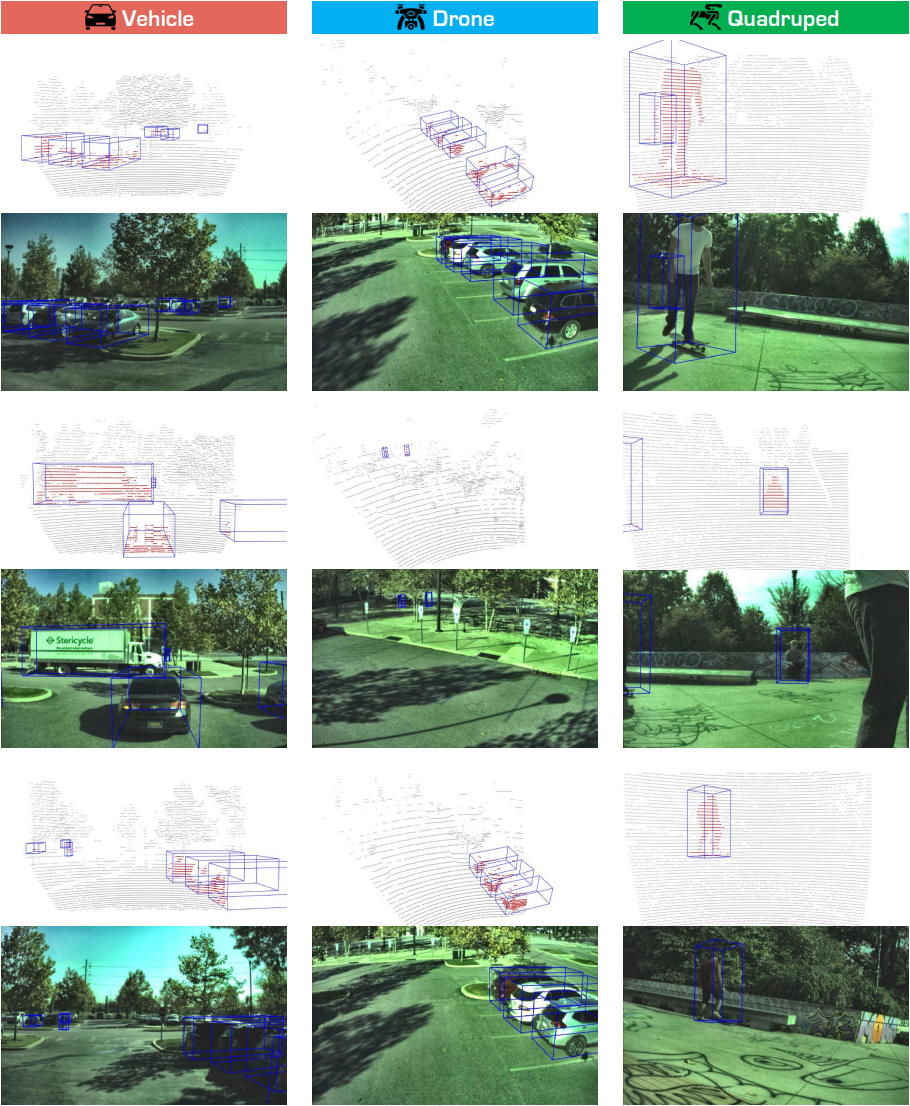
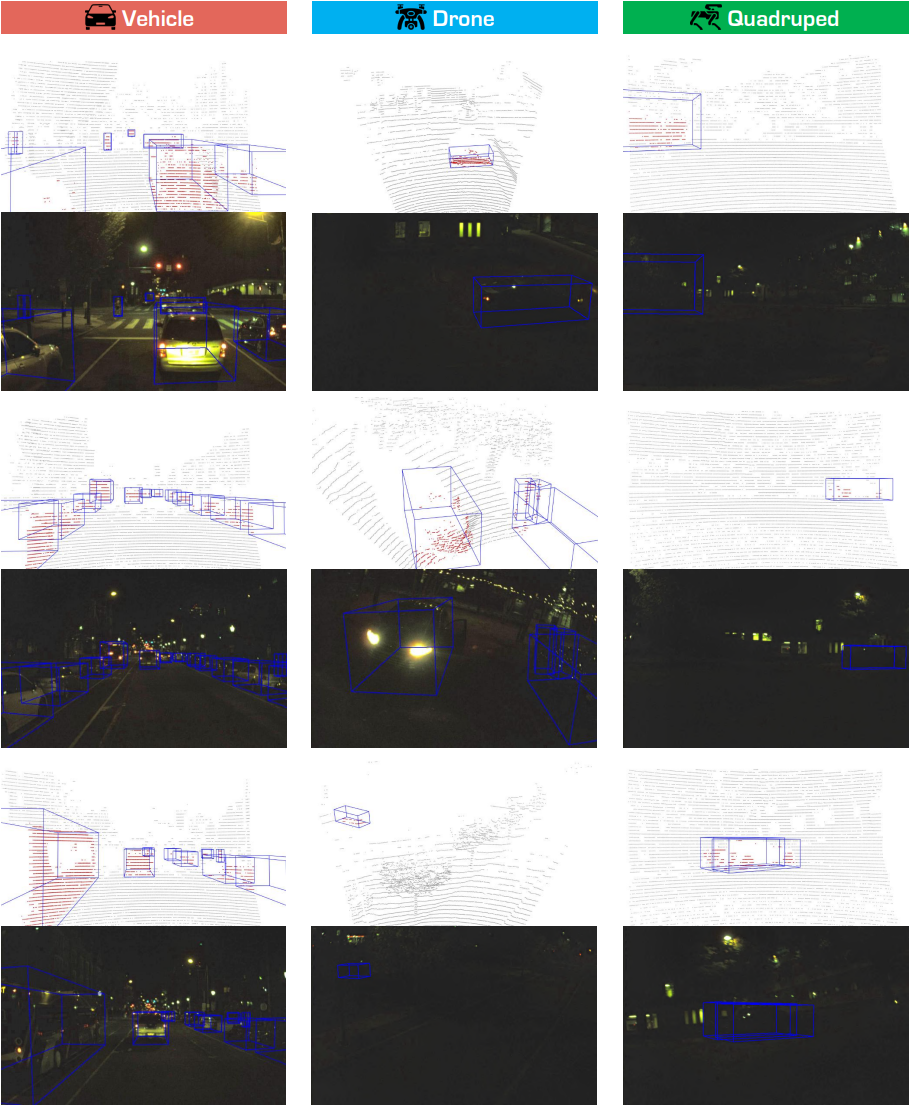
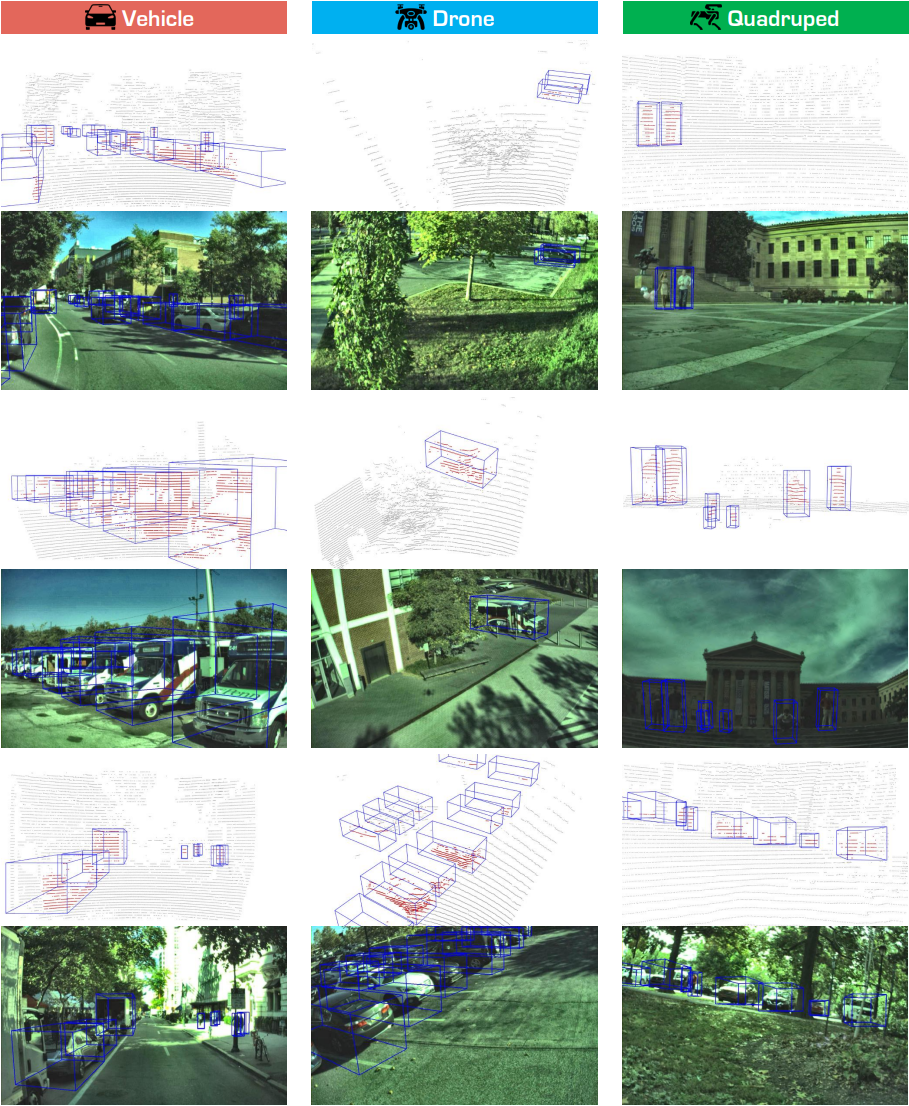
Examples
- Downloads last month
- 17