
Spaces:
Running


A newer version of the Gradio SDK is available:
6.0.2
title: TraceMind AI
emoji: 🧠
colorFrom: indigo
colorTo: purple
sdk: gradio
sdk_version: 5.49.1
app_file: app.py
short_description: AI agent evaluation with MCP-powered intelligence
license: agpl-3.0
pinned: true
tags:
  - mcp-in-action-track-enterprise
  - agent-evaluation
  - mcp-client
  - leaderboard
  - gradio
🧠 TraceMind-AI

Agent Evaluation Platform with MCP-Powered Intelligence

-purple)

🎯 Track 2 Submission: MCP in Action (Enterprise) 📅 MCP's 1st Birthday Hackathon: November 14-30, 2025
Why TraceMind-AI?
The Challenge: Evaluating AI agents generates complex data across models, providers, and configurations. Making sense of it all is overwhelming.
The Solution: TraceMind-AI is your intelligent agent evaluation command center:
- 📊 Live leaderboard with real-time performance data
- 🤖 Autonomous agent chat powered by MCP tools
- 💰 Smart cost estimation before you run evaluations
- 🔍 Deep trace analysis to debug agent behavior
- ☁️ Multi-cloud job submission (HuggingFace Jobs + Modal)
All powered by the Model Context Protocol for AI-driven insights at every step.
🚀 Try It Now
- 🌐 Live Demo: TraceMind-AI Space
- 🛠️ MCP Server: TraceMind-mcp-server (Track 1)
- 📖 Full Docs: See USER_GUIDE.md for complete walkthrough
- 🎥 TraceMind-AI Full Demo (20 min): Watch on Loom
- 🎬 MCP Server Quick Demo (5 min): Watch on Loom
- 📺 MCP Server Full Demo (20 min): Watch on Loom
The TraceMind Ecosystem
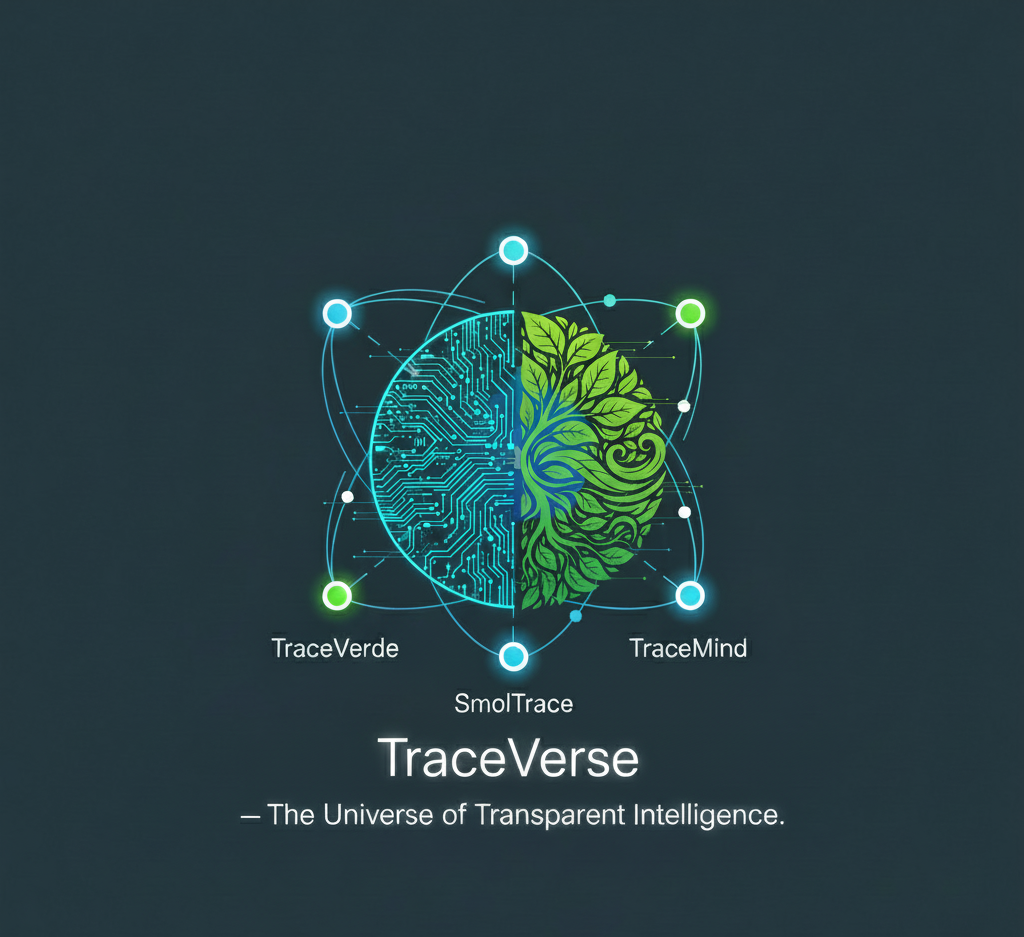
TraceMind-AI is the user-facing platform in a complete 4-project agent evaluation ecosystem:
🔭 TraceVerde                    📊 SMOLTRACE
(genai_otel_instrument)         (Evaluation Engine)
        ↓                               ↓
    Instruments                    Evaluates
    LLM calls                      agents
        ↓                               ↓
        └───────────┬───────────────────┘
                    ↓
            Generates Datasets
        (leaderboard, traces, metrics)
                    ↓
        ┌───────────┴───────────────────┐
        ↓                               ↓
🛠️ TraceMind MCP Server         🧠 TraceMind-AI
(Track 1 - Building MCP)        (This Project - Track 2)
Provides AI Tools               Consumes MCP Tools
        └───────── MCP Protocol ────────┘
The Foundation
🔭 TraceVerde - Automatic OpenTelemetry instrumentation for LLM frameworks → Captures every LLM call, tool usage, and agent step → GitHub | PyPI
📊 SMOLTRACE - Lightweight evaluation engine with built-in tracing → Generates structured datasets (leaderboard, results, traces, metrics) → GitHub | PyPI
The Platform
🛠️ TraceMind MCP Server - AI-powered analysis tools via MCP → Live Demo | GitHub → Track 1: Building MCP (Enterprise)
🧠 TraceMind-AI (This Project) - Interactive UI that consumes MCP tools → Track 2: MCP in Action (Enterprise)
Why This Matters for Hugging Face
This ecosystem is built around Hugging Face, not just "using it":
- Every SMOLTRACE evaluation creates 4 structured
datasetson the Hub (leaderboard, results, traces, metrics) - TraceMind MCP Server and TraceMind-AI run as Hugging Face Spaces, using Gradio's MCP integration
- The stack is designed for
smolagents– agents are evaluated, traced, and analyzed using HF's own agent framework - Evaluations can be executed via HF Jobs, turning evaluations into real compute usage, not just local scripts
So TraceMind isn't just another agent demo. It's an opinionated blueprint for:
"How Hugging Face models + Datasets + Spaces + Jobs + smolagents + MCP can work together as a complete agent evaluation and observability platform."
Key Features
🎯 MCP Integration (Track 2)
TraceMind-AI demonstrates enterprise MCP client usage in two ways:
1. Direct MCP Client Integration
- Connects to TraceMind MCP Server via SSE transport
- Uses 5 AI-powered tools:
analyze_leaderboard,estimate_cost,debug_trace,compare_runs,analyze_results - Real-time insights powered by Google Gemini 2.5 Flash
2. Autonomous Agent with MCP Tools
- Built with
smolagentsframework - Agent has access to all MCP server tools
- Natural language queries → autonomous tool execution
- Example: "What are the top 3 models and how much do they cost?"
📊 Agent Evaluation Features
- Live Leaderboard: View all evaluation runs with sortable metrics
- Cost Estimation: Auto-select hardware and predict costs before running
- Trace Visualization: Deep-dive into OpenTelemetry traces with GPU metrics
- Multi-Cloud Jobs: Submit evaluations to HuggingFace Jobs or Modal
- Performance Analytics: GPU utilization, CO2 emissions, token tracking
💡 Smart Features
- Auto Hardware Selection: Based on model size and provider
- Real-time Job Monitoring: Track HuggingFace Jobs status
- Agent Reasoning Visibility: See step-by-step tool execution
- Quick Action Buttons: One-click common queries
Quick Start
Option 1: Use the Live Demo (Recommended)
- Visit: https://huggingface.co/spaces/MCP-1st-Birthday/TraceMind
- Login: Sign in with your HuggingFace account
- Explore: Browse the leaderboard, chat with the agent, visualize traces
Option 2: Run Locally
# Clone and setup
git clone https://github.com/Mandark-droid/TraceMind-AI.git
cd TraceMind-AI
pip install -r requirements.txt

# Configure environment
cp .env.example .env
# Edit .env with your API keys (see Configuration section)

# Run the app
python app.py
Visit http://localhost:7860
Configuration
For Viewing (Free)
Required:
- HuggingFace account (free)
- HuggingFace token with Read permissions
For Submitting Jobs (Paid)
Required:
- ⚠️ HuggingFace Pro ($9/month) with credit card
- HuggingFace token with Read + Write + Run Jobs permissions
- LLM provider API keys (OpenAI, Anthropic, etc.)
Optional (Modal Alternative):
- Modal account (pay-per-second, no subscription)
- Modal API token (MODAL_TOKEN_ID + MODAL_TOKEN_SECRET)
Using Your Own API Keys (Recommended for Judges)
To prevent rate limits during evaluation:
Step 1: Configure MCP Server (Required for AI tools)
- Visit: https://huggingface.co/spaces/MCP-1st-Birthday/TraceMind-mcp-server
- Go to ⚙️ Settings tab
- Enter: Gemini API Key + HuggingFace Token
- Click "Save & Override Keys"
Step 2: Configure TraceMind-AI (Optional)
- Visit: https://huggingface.co/spaces/MCP-1st-Birthday/TraceMind
- Go to ⚙️ Settings tab
- Enter: Gemini API Key + HuggingFace Token
- Click "Save API Keys"
Get Free API Keys:
- Gemini: https://ai.google.dev/ (1,500 requests/day)
- HuggingFace: https://huggingface.co/settings/tokens (unlimited for public datasets)
For Hackathon Judges
✅ Track 2 Compliance
- MCP Client Integration: Connects to remote MCP server via SSE transport
- Autonomous Agent:
smolagentsagent with MCP tool access - Enterprise Focus: Cost optimization, job submission, performance analytics
- Production-Ready: Deployed to HuggingFace Spaces with OAuth authentication
- Real Data: Live HuggingFace datasets from SMOLTRACE evaluations
🎯 Key Innovations
- Dual MCP Integration: Both direct MCP client + autonomous agent with MCP tools
- Multi-Cloud Support: HuggingFace Jobs + Modal for serverless compute
- Auto Hardware Selection: Smart hardware recommendations based on model size
- Complete Ecosystem: Part of 4-project platform demonstrating full evaluation workflow
- Agent Reasoning Visibility: See step-by-step MCP tool execution
📹 Demo Materials
- 🎥 TraceMind-AI Full Demo (20 min): Watch on Loom - Complete walkthrough of all features
- 🎬 MCP Server Quick Demo (5 min): Watch on Loom - Quick intro to MCP tools
- 📺 MCP Server Full Demo (20 min): Watch on Loom - Deep dive into MCP server
- 📝 Blog Post: Building TraceMind Ecosystem - Technical deep-dive
- 🚀 LinkedIn Post: TraceMind-AI Hackathon Submission - Final submission announcement
🧪 Testing Suggestions
1. Try the Agent Chat (🤖 Agent Chat tab):
- "Analyze the current leaderboard and show me the top 5 models"
- "Compare the costs of the top 3 models"
- "Estimate the cost of running 100 tests with GPT-4"
2. Explore the Leaderboard (📊 Leaderboard tab):
- Click "Load Leaderboard" to see live data
- Read the AI-generated insights (powered by MCP server)
- Click on a run to see detailed test results
3. Visualize Traces (Select a run → View traces):
- See OpenTelemetry waterfall diagrams
- View GPU metrics overlay (for GPU jobs)
- Ask questions about the trace (MCP-powered debugging)
What Can You Do?
📊 View & Analyze
- Browse leaderboard with AI-powered insights
- Compare models side-by-side across metrics
- Analyze traces with interactive visualization
- Ask questions via autonomous agent
💰 Estimate & Plan
- Get cost estimates before running evaluations
- Compare hardware options (CPU vs GPU tiers)
- Preview duration and CO2 emissions
- See recommendations from AI analysis
🚀 Submit & Monitor
- Submit evaluation jobs to HuggingFace or Modal
- Track job status in real-time
- View results automatically when complete
- Download datasets for further analysis
🧪 Generate & Customize
- Generate synthetic datasets for custom domains and tools
- Create prompt templates optimized for your use case
- Push to HuggingFace Hub with one click
- Test evaluations without writing code
Documentation
For quick evaluation:
- Read this README for overview
- Visit the Live Demo to try it
- Check out the 🤖 Agent Chat tab for autonomous MCP usage
For deep dives:
- USER_GUIDE.md - Complete screen-by-screen walkthrough
- Leaderboard tab usage
- Agent chat interactions
- Synthetic data generator
- Job submission workflow
- Trace visualization guide
- MCP_INTEGRATION.md - MCP client architecture
- How TraceMind-AI connects to MCP server
- Agent framework integration (smolagents)
- MCP tool usage examples
- JOB_SUBMISSION.md - Evaluation job guide
- HuggingFace Jobs setup
- Modal integration
- Hardware selection guide
- Cost optimization tips
- ARCHITECTURE.md - Technical architecture
- Project structure
- Data flow
- Authentication
- Deployment
Technology Stack
- UI Framework: Gradio 5.49.1
- Agent Framework: smolagents 1.22.0+
- MCP Integration: MCP Python SDK + smolagents MCPClient
- Data Source: HuggingFace Datasets API
- Authentication: HuggingFace OAuth (planned)
- AI Models:
- Agent: Google Gemini 2.5 Flash
- MCP Server: Google Gemini 2.5 Flash
- Cloud Platforms: HuggingFace Jobs + Modal
Example Workflows
Workflow 1: Quick Analysis
- Open TraceMind-AI
- Go to 🤖 Agent Chat
- Click "Quick: Top Models"
- See agent fetch leaderboard and analyze top performers
- Ask follow-up: "Which one is most cost-effective?"
Workflow 2: Submit Evaluation Job
- Go to ⚙️ Settings → Configure API keys
- Go to 🚀 New Evaluation
- Select model (e.g.,
meta-llama/Llama-3.1-8B) - Choose infrastructure (HuggingFace Jobs or Modal)
- Click "💰 Estimate Cost" to preview
- Click "Submit Evaluation"
- Monitor job in 📊 Job Monitoring tab
- View results in leaderboard when complete
Workflow 3: Debug Agent Behavior
- Browse 📊 Leaderboard
- Click on a run with failures
- View detailed test results
- Click on a failed test to see trace
- Use MCP-powered Q&A: "Why did this test fail?"
- Get AI analysis of the execution trace
Workflow 4: Generate Custom Test Dataset
- Go to 🔬 Synthetic Data Generator
- Configure:
- Domain:
finance - Tools:
get_stock_price,calculate_profit,send_alert - Number of tasks:
20 - Difficulty:
balanced
- Domain:
- Click "Generate Dataset"
- Review generated tasks and prompt template
- Enter repository name:
yourname/smoltrace-finance-tasks - Click "Push to HuggingFace Hub"
- Use your custom dataset in evaluations
Screenshots
See SCREENSHOTS.md for annotated screenshots of all screens
🔗 Quick Links
📦 Component Links
| Component | Description | Links |
|---|---|---|
| TraceVerde | OTEL Instrumentation | GitHub • PyPI |
| SMOLTRACE | Evaluation Engine | GitHub • PyPI |
| MCP Server | Building MCP (Track 1) | HF Space • GitHub |
| TraceMind-AI | MCP in Action (Track 2) | HF Space • GitHub |
📢 Community Posts
- 🚀 TraceMind-AI Hackathon Submission - MCP's 1st Birthday Hackathon final submission
- 📝 Building TraceMind Ecosystem Blog Post - Complete technical deep-dive into the TraceVerse ecosystem
- 🎉 TraceMind Teaser - MCP's 1st Birthday Hackathon announcement
- 📊 SMOLTRACE Launch - Lightweight agent evaluation engine
- 🔭 TraceVerde Launch - Zero-code OTEL instrumentation for LLMs
- 🙏 TraceVerde 3K Downloads - Thank you to the community!
Credits
Built for: MCP's 1st Birthday Hackathon (Nov 14-30, 2025) Track: MCP in Action (Enterprise) Author: Kshitij Thakkar Powered by: TraceMind MCP Server + Gradio + smolagents Built with: Gradio 5.49.1 (MCP client integration)
Special Thanks:
- Eliseu Silva - For the gradio_htmlplus custom component that powers our interactive leaderboard table. Eliseu's timely help and collaboration during the hackathon was invaluable!
Sponsors: HuggingFace • Google Gemini • Modal • Anthropic • Gradio • OpenAI • Nebius • Hyperbolic • ElevenLabs • SambaNova • Blaxel
License
AGPL-3.0 - See LICENSE for details
Support
- 📧 GitHub Issues: TraceMind-AI/issues
- 💬 HF Discord:
#mcp-1st-birthday-official🏆 - 🏷️ Tag:
mcp-in-action-track-enterprise - 🐦 Twitter: @TraceMindAI (placeholder)
Ready to evaluate your agents with AI-powered intelligence?
🌐 Try the live demo: https://huggingface.co/spaces/MCP-1st-Birthday/TraceMind