

| # The 4 Kinds of Gradio Interfaces | |
| So far, we've always assumed that in order to build an Gradio demo, you need both inputs and outputs. But this isn't always the case for machine learning demos: for example, _unconditional image generation models_ don't take any input but produce an image as the output. | |
| It turns out that the `gradio.Interface` class can actually handle 4 different kinds of demos: | |
| 1. **Standard demos**: which have both separate inputs and outputs (e.g. an image classifier or speech-to-text model) | |
| 2. **Output-only demos**: which don't take any input but produce on output (e.g. an unconditional image generation model) | |
| 3. **Input-only demos**: which don't produce any output but do take in some sort of input (e.g. a demo that saves images that you upload to a persistent external database) | |
| 4. **Unified demos**: which have both input and output components, but the input and output components _are the same_. This means that the output produced overrides the input (e.g. a text autocomplete model) | |
| Depending on the kind of demo, the user interface (UI) looks slightly different: | |
| 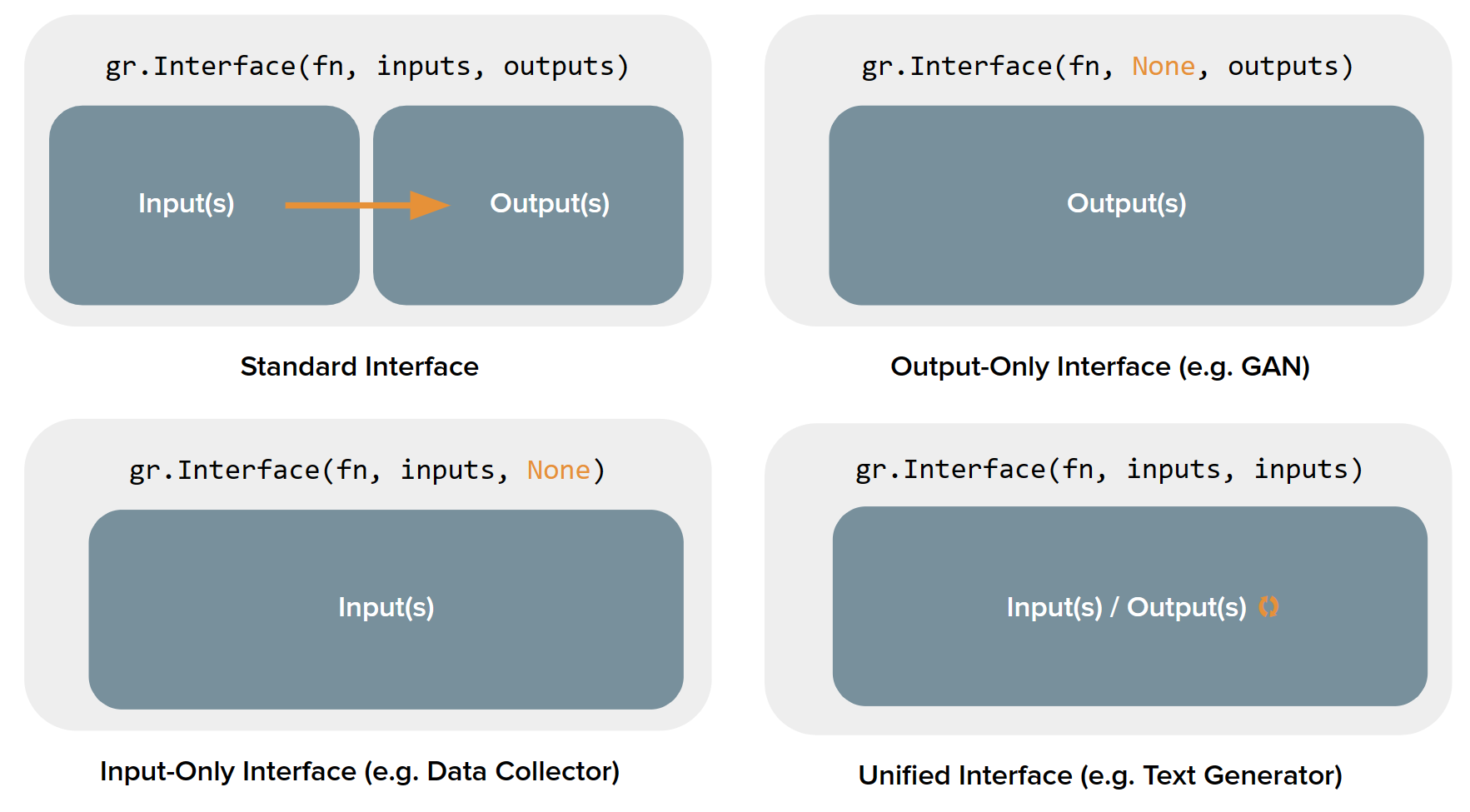 | |
| Let's see how to build each kind of demo using the `Interface` class, along with examples: | |
| ## Standard demos | |
| To create a demo that has both the input and the output components, you simply need to set the values of the `inputs` and `outputs` parameter in `Interface()`. Here's an example demo of a simple image filter: | |
| $code_sepia_filter | |
| $demo_sepia_filter | |
| ## Output-only demos | |
| What about demos that only contain outputs? In order to build such a demo, you simply set the value of the `inputs` parameter in `Interface()` to `None`. Here's an example demo of a mock image generation model: | |
| $code_fake_gan_no_input | |
| $demo_fake_gan_no_input | |
| ## Input-only demos | |
| Similarly, to create a demo that only contains inputs, set the value of `outputs` parameter in `Interface()` to be `None`. Here's an example demo that saves any uploaded image to disk: | |
| $code_save_file_no_output | |
| $demo_save_file_no_output | |
| ## Unified demos | |
| A demo that has a single component as both the input and the output. It can simply be created by setting the values of the `inputs` and `outputs` parameter as the same component. Here's an example demo of a text generation model: | |
| $code_unified_demo_text_generation | |
| $demo_unified_demo_text_generation | |
| It may be the case that none of the 4 cases fulfill your exact needs. In this case, you need to use the `gr.Blocks()` approach! |